
Security & Administration
Access Control
Access Control allows you to restrict which computers are able to request licenses and updates. You can specify a list of computers that you want to grant access, requests coming from other computers will be rejected.
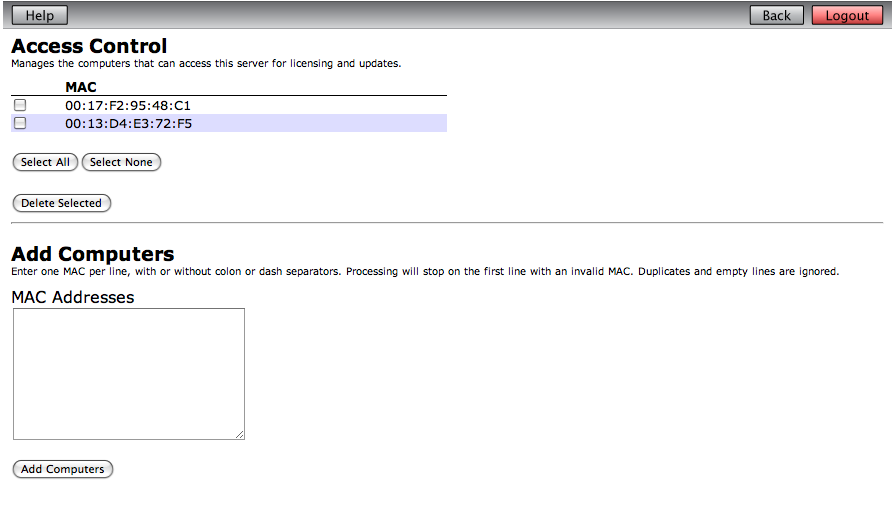
Computers are identified by their MAC address, the physical address of their network adapter. The list at the top of the page shows the MACs that have have been defined (see screenshot 1). Add MACs by entering their MACs in the Add Computers edit field. You can enter as many MACs as you need, one on each line. The MAC can be entered in any one of the following forms:
- 00:17:F2:95:48:C1
- 00-17-F2-95-48-C1
- 0017F29548C1
You can delete MACs by ticking the checkbox next to them and pressing the Delete Selected button.
Manage Admin Users
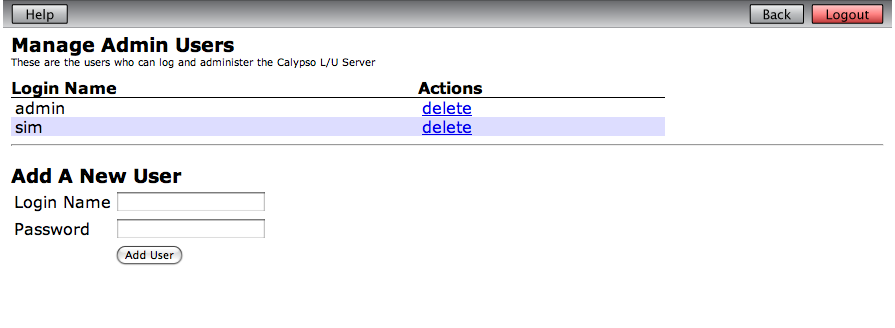
To access the FrontRow Calypso L/U Service administration web site, users must enter a user name and password to authenticate themselves with the service. The Manage Admin Users (see screenshot 2) page allows you to add and remove users, so granting or revoking access.
The list shows the current administration users. You can delete a user by clicking the delete button next to the name.
To add a new user, enter their credentials in the Login Name and Password fields and press Add User.
There is no way to recover a lost password, so if a user forget theirs you will have to delete and re-create their login.